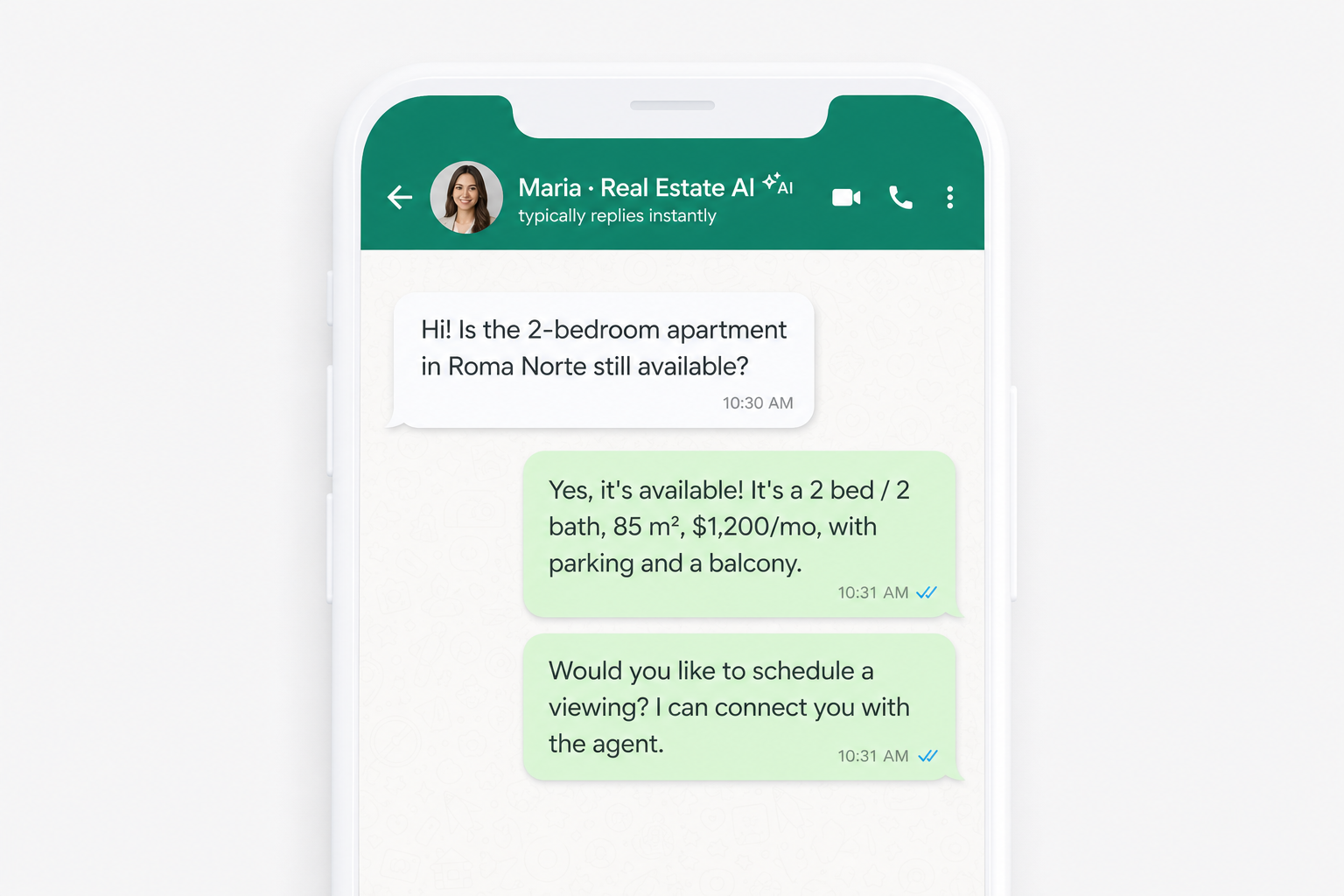
A buyer texts you Sunday night at 10 PM asking about a condo in Brooklyn. Three hours later, when you finally check your phone, they've already contacted another agent. In real estate, response speed is part of the sale.
That's why we built the AI WhatsApp agent: an assistant that handles incoming messages using the real data from your listings, qualifies leads, and hands the conversation to you when a human touch is needed.
It doesn't replace your judgment or your personal touch. It takes the repetitive work off your plate so you step in when the buyer is ready — a showing, a negotiation, or a serious offer.
Unanswered messages = lost deals
Most agents get inquiries after hours, on weekends, or while they're at a showing. Answering "bedrooms, price, and neighborhood" over and over eats time you could spend closing.
A generic auto-responder doesn't cut it — it makes up details, sounds robotic, and hurts your brand. What you need is something that replies with your actual listings, in a professional tone, and knows when to get you on the phone.
What is the AI WhatsApp agent?
It's an assistant connected to your WhatsApp Business account that reads incoming messages and replies using the catalog you have in SimpleListings: published listings, prices, bedrooms, neighborhoods, and descriptions.
You can also give it business details: neighborhoods you cover, showing hours, rental requirements, commission policies, and topics it shouldn't promise. That information combines with your catalog to produce answers that match how you actually work.
24/7
Replies in seconds, even when you're at a showing or off the clock
Real data
Uses only your catalog — never invents listings or prices
Smart handoffs
Passes the chat to you when a person is needed
What does the assistant handle?
In practice, the agent covers the tasks that take the most time and add the least value:
- Answers common questions about price, bedrooms, bathrooms, neighborhood, and availability
- Searches your catalog when a buyer describes what they want (for sale or for rent, budget, area)
- Shares listing details for a specific property and sends the link to its page
- Qualifies the lead: budget, timeline, preferred neighborhood, and buying or renting intent
- Logs showing requests and alerts you so you can confirm date and time
- Greets new conversations with a customizable welcome message
Everything lands in your Messages inbox, along with the conversation history and the details the assistant collected. You enter the chat with context — not from scratch.
When does it hand off to you?
The assistant doesn't try to close deals or negotiate. When it detects that a person is needed, it routes the conversation to you and, if enabled, sends an email alert.
It hands off in situations like:
- The buyer wants to schedule a showing with a specific date and time
- They ask about negotiation, commissions, or legal topics
- They send voice notes, documents, or files the assistant can't interpret
- The question isn't covered by your catalog or business notes
- There's a serious buyer with clear intent who deserves your direct attention
Transparency with your clients
You can enable a welcome message that clarifies it's a virtual assistant. We recommend turning off WhatsApp Business's built-in greeting to avoid duplicate auto-replies.
How to set up the agent
Getting started takes four steps. Most agents have it running in a few minutes:
- Connect WhatsApp Business from Edit profile → Integrations
- Import your conversation history (optional, but recommended for context)
- Configure the AI agent: tone, business notes, and welcome message
- Enable auto-replies and monitor everything from Messages
You can choose a voice tone (friendly, professional, or warm) and use a notes template to specify your service area, rental requirements, showing hours, and when to hand off to you.
Available on the Advanced plan
The AI agent is included on the Advanced plan, with a monthly allowance of automated replies. The Pro plan includes the WhatsApp button on your listing pages, but not the AI assistant. View plans →
What changes when you connect WhatsApp Business
So the AI agent and your WhatsApp Business app can share the same number, WhatsApp turns on coexistence mode. You keep chatting from your phone as usual, but Meta applies a few rules. Worth knowing before you connect.
Before you connect
WhatsApp limitations when you use the app and SimpleListings on the same number.
Features turned off in 1-to-1 chats
These options stop working in individual conversations (so the app and SimpleListings stay in sync):
- Disappearing messages — no longer available
- View-once photos or videos — turned off
- Broadcast lists — existing ones become read-only; you can't create new ones from the app
How to keep the connection stable
- Open the app at least every 13–14 days. If WhatsApp Business sits unused on your phone for more than about two weeks, WhatsApp may disconnect the account automatically.
- Don't uninstall or reinstall WhatsApp Business while it's connected. That breaks the link with SimpleListings.
- Linked devices. You can use up to 4 (for example WhatsApp Web or the Mac app). When you connect, WhatsApp unlinks them all — you'll need to link them again. WhatsApp for Windows is not supported in this mode.
If your number is already on the API, or you want to disconnect
- The number must start from the app. If your number is already registered only on the WhatsApp API (without the app), you can't switch it over directly. It first needs to be released in Meta Business Manager, then used again with WhatsApp Business on your phone.
- To disconnect, do it from your phone: Settings → Account → Business Platform → Disconnect Account. You can't cut the connection only from an external tech dashboard.
You stay in control of every chat
The assistant doesn't lock you out of conversations. At any time you can:
- Reply yourself from SimpleListings or the WhatsApp Business app
- Pause the AI on a specific chat while you're handling it
- Set when it resumes (never, after 1 hour, 4 hours, 1 day, or 3 days of your inactivity)
- Disable the agent entirely if you prefer to reply manually
When you reply, the AI steps aside so it doesn't overlap your messages. If you stop responding, it can resume based on the timeline you've set. That way you get automation and the personal touch that closes deals.