Most clients are happy to leave you a review. They just don’t do it on their own. In real estate the problem is bigger: a client buys or sells once every several years, so if you don’t ask at the right moment, the chance is gone.
This guide covers when to ask (by type of client), 20 short scripts you can copy for text, WhatsApp, email and in person, how to ask for a Google review without breaking Google’s rules, and what to do with the reviews once you have them.
Want the asking done for you? SimpleListings writes the message, sends it by WhatsApp, text or email, reminds the client by email, and shows each review on your listings once you approve it. See how · Start free
Quick answer: how to ask a client for a review
Ask within a few days of closing, while the experience is fresh. Send a short, personal message by text, WhatsApp or email (wherever you already talk to the client) with one direct link that opens the review form. Ask every client, not only the happy ones, never offer anything in exchange, and follow up once after three to five days if they don’t answer. Here’s a sample text:
Hi [Client name]! Congrats again on your new home. Would you leave me a short review? It takes a minute and helps other buyers find me: [link] Thank you! [Your name]
The same steps work for a testimonial for your website: ask at the same moment, with the same kind of message, and ask permission to show their name.
Jump to scripts for:
When to ask for a review in real estate
Ask when the client feels the result, not when they’re signing paperwork. In real estate, these are the moments that work:
- Closing day or the key handover. The best single moment. Ask in person, then send the link that evening.
- Move-in week. The boxes are open and the client is enjoying the place. A good time if closing day was rushed.
- Right after a big win. An accepted offer after losing several, a repair credit, a saved deal. Note the detail, then ask after closing and mention it: “Remember when we finally won [street name]?”
- When the client thanks you. If a client texts “you’re the best,” reply with thanks and the link. They just wrote the review; they only need a place to post it.
- Past clients, on their home anniversary. Most agents have years of happy clients who were never asked. One personal message each, spread out over a few weeks.
Best timing by type of client
Buyers
Key handover or the first week in the house. First-time buyers are often the most grateful; ask them in person.
Sellers
Once the money has landed, usually a day or two after closing. Sellers who are also buying may be busy; wait until they’ve moved.
Renters
Move-in week, after they’ve settled in. Rental reviews are short, so a text works best.
Landlords
When the tenant has moved in and the first rent has been paid, which shows that you placed a good tenant.
Investors
After closing, or once the property is rented and performing. Investors buy again, so ask early and keep the relationship.
Deals that went sideways
Wait until the problem is fully solved and the client has the keys. Then ask honestly; these clients often write the most convincing reviews.
Don’t ask at the closing table. The client is signing dozens of pages and worrying about the wire transfer. Ask once the keys are in their hand.
20 review request scripts for text, WhatsApp and email
Copy a script, replace everything in [brackets], and paste your review link where it says [link]. A detail only you would know, like the street, the neighborhood or what happened during the deal, makes the message read like you wrote it just for them.
Short messages get more replies. Every script below fits on one phone screen.
Text message (SMS) scripts
Text works best for clients you’ve been texting during the deal. Keep it to two or three lines, put the link on its own line, and send it from your own phone, not a no-reply number.
Buyer, on closing day
Hi [Client name]! Congrats again on the keys to your new place in [neighborhood]. It was a pleasure helping you find it. Would you leave me a short review? It takes about a minute and helps other buyers find me: [link] Thank you! [Your name]
Seller, after closing
Hi [Client name], the sale of [street name] is officially closed! Thank you for trusting me with it. If you have a minute, a short review about how the sale went would mean a lot: [link] [Your name]
Renter, move-in week
Hi [Client name], how are you settling into [building / neighborhood]? If you’re happy with how the search went, would you leave me a quick review? One minute, from your phone: [link]
Landlord, after the tenant moves in
Hi [Client name], [tenant first name] moved in today and the first month’s rent is in. Thanks for trusting me with your [condo]. Would you write a short review about how finding the tenant went? [link]
Past client, on their home anniversary
Hi [Client name]! [One year] ago today you got the keys to your home in [neighborhood]. Happy home anniversary! I’m asking a few past clients for a review this month. If you have a minute, it would help me a lot: [link]
A deal that had problems
Hi [Client name], I know this one wasn’t easy, with the [appraisal / financing / repairs] and the delayed closing. Thank you for your patience. I’d value an honest review of how I handled it, good or bad: [link]
WhatsApp scripts
If your client lives on WhatsApp (international buyers, relocations, clients with family abroad), ask there. The link preview shows up in the chat, and clients can answer with a voice note if they have a question.
Short and simple (our default message)
Hi [Client name]! Thanks again for trusting me. Would you leave me a short review? It takes one minute and helps others find me: [link] [Your name]
This is the message SimpleListings prepares for you when you create a review request.
Relocation or long-distance buyer
Hi [Client name]! I hope the move from [city] went well and the house already feels like home. Since we did most of this over WhatsApp and video calls, a review from you would help other families buying from far away trust me. It takes a minute: [link] Thank you!
Invite a short video instead of writing
Hi [Client name]! A small favor: would you leave me a review? If writing isn’t your thing, you can record a 30-second video from your phone instead, just saying how [buying / selling] went: [link] Thank you!
Spanish-speaking client (in Spanish)
¡Hola [Client name]! Gracias otra vez por confiar en mí. ¿Me dejarías una reseña corta? Toma un minuto y ayuda a otras familias a encontrarme: [link] [Your name]
Ask in the language you worked in. A review in Spanish also helps Spanish-speaking buyers find you.
Review request email templates
Email is better for longer asks, past clients you haven’t texted in a while, and clients who prefer it. Put the client’s name in the subject line and one clear button or link in the body.
Buyer, a few days after closing
Subject: [Client name], could you help me with a short review?
Hi [Client name], Congratulations again on your new home in [neighborhood]. Thank you for trusting me with such a big decision. Would you leave me a short review? It takes about a minute and helps other buyers decide whether to work with me: [link] Not sure what to write? A couple of sentences about what you were looking for and how the search went is perfect. Thank you! [Your name] [Phone]
Seller, after closing
Subject: Thank you for trusting me with [street name]
Hi [Client name], Now that the sale is closed, I wanted to thank you again. I know selling a home you’ve lived in for [years] isn’t only a financial decision. If you have a minute, would you leave me a review? Sellers who are interviewing agents read them closely, and it helps most when you mention how the sale went: the pricing, the offers, and how it ended. [link] Thanks again, [Your name]
Past clients (one personal email each)
Subject: A quick favor, [Client name]?
Hi [Client name], It’s been [two years] since you moved into [neighborhood]. I hope the house is treating you well! I’m asking past clients for reviews this month. If you remember working with me fondly, would you write a few lines about it? It takes a minute: [link] And if you ever need a contractor, a refinance contact or a value estimate, just reply to this email. [Your name]
What to say in person or on the phone
Asking face to face is the most personal way to ask, and clients rarely say no. But nobody leaves a review standing in a driveway, so ask in person and send the link the same day.
At the key handover
Before you go, can I ask a favor? Reviews are how a lot of new clients find me. I’ll text you a link tonight. It takes a minute, and you can just say how the search went in your own words. Would that be okay?
On the “we’re closed” phone call
I’m so glad we got this done. One more thing: would you be open to leaving me a quick review? I’ll send you the link right after we hang up. Honest is best, even if there’s something you think I could have done better.
Follow-up reminder scripts
Most people who don’t answer simply forgot. Send one friendly reminder three to five days later, in the same channel, then let it go.
Text or WhatsApp reminder
Hi [Client name]! Just a friendly reminder in case my message got buried: your review would mean a lot to me. It takes one minute: [link] Thank you! [Your name]
Email reminder
Subject: [Client name], in case you missed it: could you help me with a short review?
Hi [Client name], Just a friendly reminder in case my message got buried: your review would mean a lot to me. It only takes a minute. [link] Thank you! [Your name]
How to ask for a Google review
Google reviews show up when people search your name or “realtor near me,” and on Google Maps. Asking for one works the same as any review, with one extra step: you need a link that opens your review box directly. “Search for me on Google” loses most people at the search step.
1. Get your direct Google review link
- You need a Google Business Profile. Google’s guidelines allow individual practitioners like real estate agents to have their own profile, separate from the brokerage’s. Our guide on how to get more Google reviews as an agent covers the setup, including working from home and changing brokerages.
- Open your profile (search your business name on Google while signed in) and look for Ask for reviews or Get more reviews.
- Copy the link. That’s the link you’ll paste into your messages.
Can’t find it? Use our free Google review link generator: search your business, copy your link and download a QR code for your business cards and open house sign-in table.
2. Send a Google review request
Any script above works with your Google link. These three are written for Google:
Google review request (text or WhatsApp)
Hi [Client name]! Would you leave me a review on Google? It’s how most people find me, and the link opens the review box directly: [Google review link] Thank you! [Your name]
Google review request email template
Subject: Would you share your experience on Google?
Hi [Client name], Congratulations again on your new home, and thank you for working with me. Would you leave me a short review on Google? This link opens the review box, so it only takes a minute: [Google review link] Thank you! [Your name]
They already sent you a testimonial
Thank you so much for the kind words, [Client name]! Would you paste the same text on Google too? It helps people searching for an agent in [city] find me. Here’s the direct link: [Google review link]
3. Follow Google’s rules
Google removes reviews that break its policies and can restrict profiles that keep doing it. In plain words:
- Ask everyone. Asking for reviews is allowed, but asking only the clients you expect to be happy (“review gating”) is not.
- Don’t offer anything in exchange. No gift cards, discounts, raffles or commission credits for a review, even if you don’t ask for five stars.
- Don’t screen out unhappy clients. Don’t send a “how did we do?” survey first and only pass the Google link to people who answered well, and don’t discourage anyone from posting a negative review.
- Never write reviews for clients, post them from your team’s accounts, or ask friends and family to review you as if they were clients.
In the US, the FTC’s rule on consumer reviews and testimonials (in force since October 2024) also bans fake reviews, paying for reviews that have to be positive or negative, and threatening people to remove a negative review. Zillow and Realtor.com have their own review policies too, so check them before you ask there.
Make it easy for clients to say yes
Clients don’t refuse to leave reviews. They put it off because it feels like work, and then forget. Remove every step you can:
- One link, one tap. The link should open the review form, not your profile, your website or a list of five sites. One site per request.
- No login if you can avoid it. Google needs a Google account and Zillow needs a Zillow account. A form on your own page doesn’t need either, which is why many agents collect a testimonial first and invite the client to Google afterward.
- Built for the phone. Almost every client will open your link on their phone, from a text. Test your link on your own phone before you send it.
- Let them talk instead of type. Some clients will happily record a 30-second video but won’t write a paragraph. Video testimonials are also the most convincing kind.
- Give them ideas. “I don’t know what to write” is the most common reason a review never gets written. Send our realtor review examples along with your request.
- Ask both clients. If you helped a couple, each person can leave their own review. Ask them both, by name.
Mistakes that cost you reviews
Instead of this
Do this
Instead of: “Please review us on Google!” with no link
Do this: A direct link that opens the review box
Instead of: One mass email to your whole database
Do this: One personal message per client, with their name
Instead of: Waiting a month after closing
Do this: Asking between closing and move-in week
Instead of: Three or four reminders
Do this: One friendly reminder, then let it go
Instead of: Asking only the clients who loved you
Do this: Asking every client after closing
Instead of: A $25 gift card for every review
Do this: A closing gift for everyone, not tied to reviews
What to do after you get reviews
A review that sits on one site only helps people who happen to look there. Put each review to work:
- Reply to every review. A short, personal thank-you, and a calm answer to negative ones. Future clients read your replies. Copy one of our review reply templates.
- Thank the client personally. A text that says “I just read your review, thank you” keeps the relationship warm for referrals.
- Show them on your bio link page. The link in your Instagram or TikTok bio is often the first page a new lead opens. See our real estate bio link guide.
- Add them to your listings. A buyer looking at a home is deciding whether to contact you. A review from a past buyer in the same area helps them decide.
- Turn them into social posts. One review makes one post or story: the quote, the client’s first name and the neighborhood.
- Bring them to listing appointments. Sellers interviewing agents want proof from sellers like them. Print two or three from their area.
How to ask for reviews with SimpleListings
Everything in this guide is built into SimpleListings testimonials, so asking takes about ten seconds per client:
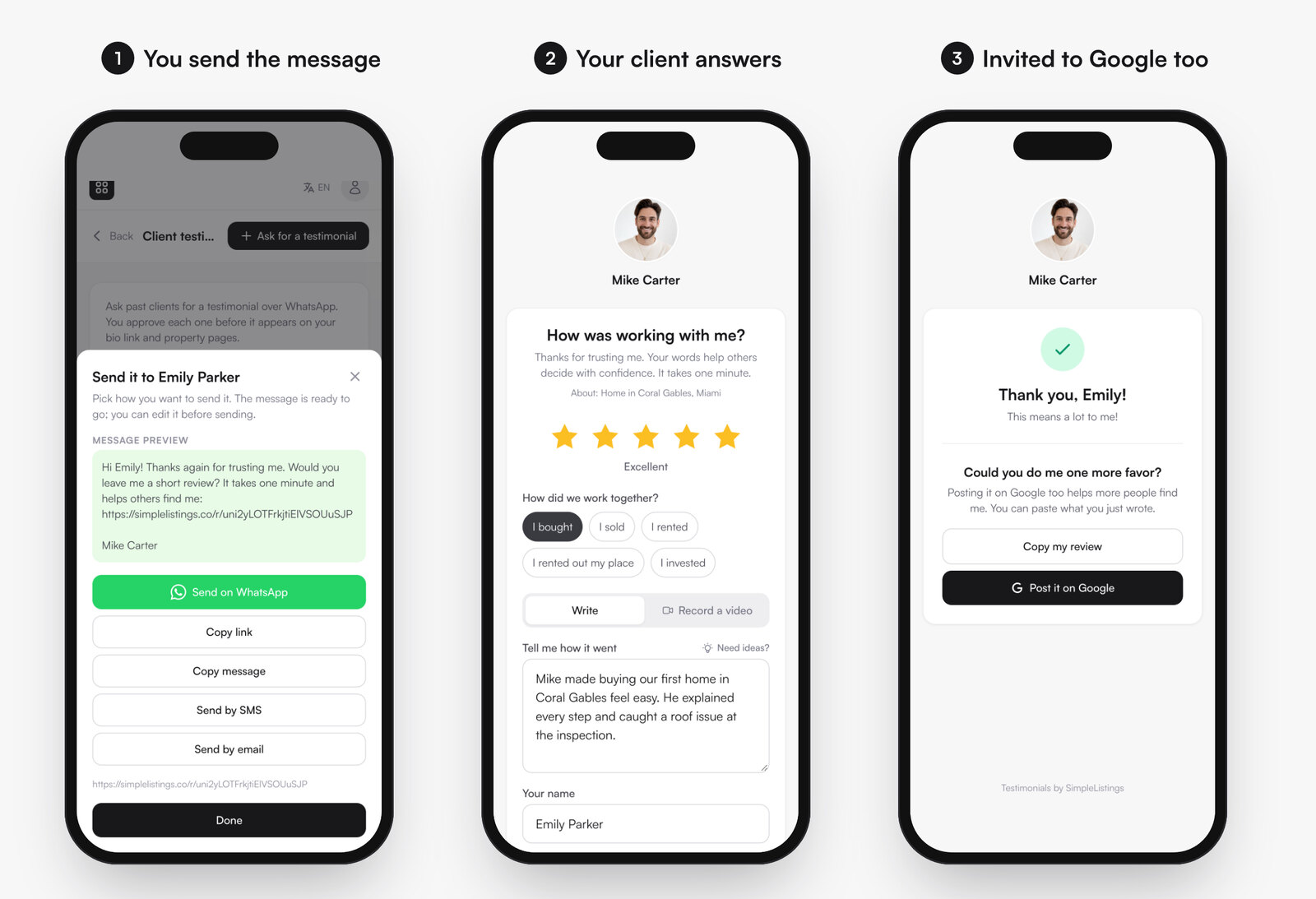
- Create the request. Type the client’s name, and optionally their phone, email and the property. The message language can be English, Spanish or Portuguese.
- Send it your way. The message is ready to go: send it on WhatsApp, by SMS or by email, or copy the link. You can edit the message before sending.
- Your client answers in about a minute. No app, no account: stars, a few words or a short video (Pro), with ideas for buyers, sellers, renters, landlords and investors if they get stuck.
- Reminders. If you added an email and they haven’t answered in three days, we send one friendly reminder. For WhatsApp, a “Remind” button prepares the follow-up message for you.
- You approve each review. Nothing goes public until you publish it. Then it shows on your bio link, your listing pages, your testimonials page and your website widget.
- Google, for everyone. On Pro, after submitting, every client (whatever their rating) is invited to post the same review on Google, with a button to copy what they wrote.
You also get one general testimonial link with a QR code for your email signature, business cards and WhatsApp status, and you can turn any review into an Instagram post with a caption: download the image, or publish it straight to your feed if your Instagram is connected.
Ask your last happy client for a review today Free plan: unlimited requests, your 3 latest testimonials on your pages. Pro adds video testimonials, the Google review invite and all your testimonials everywhere.
Send my first review requestRelated: 50+ realtor review examples to send your clients and best link in bio tools for real estate agents.