Most agents don’t have a review problem. They have a system problem. They ask after a great closing, forget after the next three, run a big push once a year, and end up with a profile whose newest review is from two summers ago.
This guide covers the two halves that bring in Google reviews steadily: a Google Business Profile set up correctly for an agent (your own profile or the brokerage’s, working from home, categories, changing brokerages), and a simple routine that turns most closings into a review, without breaking Google’s rules.
Want the routine on autopilot? SimpleListings sends the request by WhatsApp, text or email, reminds the client, and on Pro invites every client to post their review on Google with one tap. See how · Start free
Quick answer: how to get more Google reviews as a real estate agent
Set up and verify a Google Business Profile in your own name (Google allows real estate agents to have one as individual practitioners), choose “Real estate agent” as your primary category, and hide your address if you work from home. Then ask every client for a Google review within a few days of closing with a direct link, run a one-time campaign to past clients, put a QR code on your closing card and business card, and reply to every review. Never pay for, swap or filter reviews.
Jump to:
Why Google reviews matter for real estate agents
Zillow and Realtor.com reviews help people who are already browsing those sites. Google reviews show up in more places, at the moments people choose an agent:
- The map results for “realtor near me.” Google ranks local results by relevance, distance and prominence, and its own help page says prominence is partly based on how many reviews you have, and that more reviews and positive ratings can help your local ranking. You can’t change your distance from the searcher; you can change your reviews.
- The search for your name. A referral rarely calls you straight away. They search your name first, and your profile shows up with your star rating and your latest reviews before your website does.
- Sellers comparing agents. Many sellers interview more than one agent and read each one’s reviews before the appointment. Recent reviews from sellers in their area are the ones they look for.
- Local Services Ads. If you ever run Google’s pay-per-lead ads, they use the reviews on your Business Profile. Google says star ratings and review count affect how you rank there, and that some business types need 5 reviews before their ads can show.
Google Business Profile for real estate agents: set it up right
Reviews are only worth collecting on a profile you’ll keep. A profile that breaks Google’s guidelines can be suspended, and its reviews go with it. These are the rules that matter for agents, from Google’s guidelines for representing your business.
Your own profile or your brokerage’s?
Google’s guidelines list real estate agents as individual practitioners, like doctors and lawyers. You can have your own profile if you work in a public-facing role and clients can reach you at your verified location during your stated hours. Which setup fits depends on where you work:
Several agents, one office
The brokerage has its own profile. Yours is separate and named with only your name, without the brokerage’s.
The only agent at a branded office
Google prefers one shared profile, named “Brand: Your Name”.
You work from home
You can still have a profile, as a service-area business with your address hidden. See below.
- One profile per agent. Google says a practitioner shouldn’t have several profiles to cover different specialties, so no separate “luxury” and “condos” profiles.
- Assistants don’t get one. Google says support staff shouldn’t create their own profiles. Add your assistant or transaction coordinator as a manager of yours instead.
- Use your real-world name. “Mike Carter,” not “Mike Carter | Best Miami Realtor | Homes for Sale.” Google’s guidelines don’t allow extra keywords, taglines or locations in the name.
Working from home: set up a service-area profile
Most agents meet clients at the property, not at an office. Google calls that a service-area business: you travel to customers instead of serving them at your address.
- Hide your home address. Google’s guidelines say service-area businesses should hide their address. Google may still need it to verify you, but it isn’t shown on your profile.
- Add the areas you actually serve. Cities, ZIP codes or neighborhoods. Google allows up to 20 service areas, and the whole area shouldn’t extend more than about two hours’ drive from where you’re based.
- No virtual offices or mailboxes. A virtual office isn’t eligible, P.O. boxes and remote mailboxes aren’t accepted, and a coworking desk only counts if it has clear signage and is staffed by you during business hours.
- Showing the brokerage address instead? Only if clients can actually meet you there during the hours on your profile, and the office has signage. If you’re rarely there, a service-area profile is the safer choice.
Category, contact details, photos and description
- Primary category: Real estate agent. Google asks you to pick the most specific category that completes the sentence “this business is a…”, and to use as few categories as possible. Add a second one only for a real separate service, like property management. Categories aren’t a place for keywords.
- Your own phone and website. A number you control and answer, not the brokerage’s front desk or a call center. For the website, link a page about you: your own site or your agent page.
- Real photos. A recent headshot, you at a listing appointment or open house, your sign on a sold home, the neighborhoods you work. Only use listing photos you have the rights to.
- Posts. Business Profile posts are a good place for new listings, open houses and recent sales. A profile with recent activity looks like an agent who is working.
Business description (no links allowed here)
[Your name] is a real estate agent with [Brokerage] helping buyers and sellers in [neighborhoods or city]. I work mostly with [first-time buyers, condo owners and families relocating to the area], and I [speak English and Spanish]. Call or text me if you’re thinking about buying or selling in [area], even if it’s a year away.
Write it the way you’d introduce yourself. Google’s guidelines don’t allow links in the description, and it shouldn’t focus on prices or promotions.
Who owns your profile, and what happens if you change brokerages
Reviews belong to the profile, not to you. Google’s guidelines don’t spell out what happens when an agent moves to another brokerage, so protect yourself before you collect reviews:
- Be the primary owner of your own profile. If your brokerage’s marketing team set it up, ask them to make you the primary owner. You can add them as a manager.
- A profile in your own name usually stays with you. When you move, you update the brokerage details, website and address if needed. Google may ask you to verify the profile again after some changes.
- A shared “Brand: Your Name” profile is different. It belongs to that office, so expect it to stay there when you leave.
- Don’t start a second profile to “start fresh.” Duplicate profiles for the same person go against Google’s guidelines and can get both suspended.
Not sure about your situation? Some brokerages have their own rules about agent profiles. Check your brokerage agreement, and if a case isn’t covered by Google’s guidelines, ask in the Business Profile help community before you change anything.
A system for a steady flow of Google reviews
A once-a-year push gets you a burst of reviews and then silence. A steady flow is better for everyone reading your profile: a seller sees reviews from last month, not 2023. It’s also safer: Google’s policy lists reviews that arrive in unusual volumes or patterns as fake engagement. Build these habits into your business instead.
1. Make the review request a closing step
Put “ask for review” on your closing checklist, right after “hand over keys,” so it happens whether the week is calm or crazy. Ask in person, then send your Google review link the same day from your own phone. If your transaction coordinator sends it, it should still come from you and use the client’s name. For the best moment by type of client, see when to ask for a review in real estate, and copy one of the 20 review request scripts. If you don’t have your link yet, here’s how to get it.
2. Run one past-client campaign
If you’ve been in the business for a few years, your fastest source of reviews is clients who were happy and never asked. Do it once, properly:
- Make the list. Every closed deal you can find: your CRM, your transaction folders, your sent emails. Add the property and the year.
- Start with the warmest. Clients who sent you referrals, still text you, or said something nice at closing.
- Three to five personal messages a day. One by one, with their name and a detail from their deal. Spread over a few weeks, it’s easy to answer every reply, and you avoid a sudden pile of reviews in one day.
- Then switch to home anniversaries. Each past client gets one message on the anniversary of their closing. The home anniversary text and the past-client email are ready to copy.
Bonus: this campaign brings back conversations. Some past clients will answer with “actually, we’re thinking of selling.”
3. Put a QR code where clients already are
Google itself suggests sharing a link or a QR code to collect reviews. Our free Google review link generator finds your link and makes the QR code for you. Good places for it:
- Your closing card or closing gift. The client opens it at home, relaxed, with their phone in hand.
- The back of your business card and the last page of your listing presentation, for past clients you run into.
- Open houses, carefully. A small card on the table is fine for past clients and neighbors who worked with you. Don’t ask visitors who toured the home for ten minutes; they haven’t worked with you, and their review wouldn’t reflect a real experience.
The client should scan it with their own phone, later. Don’t hand them your phone or tablet to post on the spot.
4. Add the link to your email signature
You send dozens of emails to clients during each deal. One line under your name reminds them, without asking again and again. Use your direct Google review link, not your profile URL.
Email signature line
Worked with me? I’d love a Google review: [Google review link]
Closing card or back of your business card (next to the QR code)
Bought or sold with me? Scan to leave a review. It takes a minute and helps other families find me. Thank you! [Your name]
5. Ask both people in a couple, separately
Each spouse or partner had their own experience with you, and each can post their own review from their own Google account. Send two separate messages, each with their name. Don’t ask one person to post for both, or to post twice.
6. Collect a testimonial first, then invite everyone to Google
Writing a review on Google means signing in, finding the box and facing an empty text field. A short testimonial form on your own page asks for none of that, so more clients finish it. Once they’ve written it, posting the same words on Google takes one paste.
One rule makes this work: invite every client to Google, whatever rating they gave you. If only the five-star testimonials get the Google link, that’s gating, which Google doesn’t allow. This is how SimpleListings testimonials work: every client sees the Google invite after submitting.
7. When the client doesn’t have a Google account
Google requires an account to post a review, and some clients don’t have one or don’t want to sign in. Tell them that an account can be made with any email address, not only Gmail. If they still prefer not to, take the testimonial on your own page instead. Never post it for them from your account or anyone else’s.
Reply when a client has no Google account
No problem at all! Google asks for an account to post reviews, but it can be any email you already use, not only Gmail. If you’d rather skip it, you can leave your review here instead, no account needed: [testimonial link] Thank you!
Your review routine on one page
Every closing
Ask in person at the key handover, send your Google link the same day, and note it in your CRM or spreadsheet.
3 to 5 days later
One friendly reminder to anyone who hasn’t posted yet. Then stop.
Every day, at first
Three to five personal messages to past clients, until you’ve reached your whole list. Then one message on each home anniversary.
Every week
Reply to every new review, good or bad.
Every month
Check your profile: new photos, a post about a recent listing or sale, and hours and service areas that are still right.
Get reviews that help you win more clients
“Great agent, highly recommend!” is nice, but it doesn’t tell a seller in Coral Gables whether you’re the right agent for their house. A review that mentions the neighborhood, the type of deal and one thing you did does.
- Give ideas, not words. In your request, add one line like “a couple of sentences about what you were looking for and how it went is perfect.” Clients who still get stuck can browse our realtor review examples or the simple review formula.
- Remind them of the details. “Remember the inspection on [street name]?” brings back the story they’ll want to tell. The story is theirs to write.
- Don’t ask for keywords. No “please mention ‘best realtor in Miami’,” no pre-written text to paste. Reviews should be in the client’s own words, and keyword-stuffed reviews read as fake to the sellers you want to convince.
Reply to every review
Future clients read your replies as closely as the reviews. Google’s own tips for replying match what works in real estate:
- Short and personal. Mention one detail from their review. Avoid pasting the same “Thank you for your kind words!” under every one.
- Not an ad. No “Call me for a free home valuation!” in a reply.
- Nothing private. Never mention the price, the financing or anything about the deal the client didn’t write themselves.
- Negative reviews: one calm reply. Acknowledge it, say what you’d do differently, and offer a call. Report a review only if it breaks Google’s policies (for example, it’s from someone who was never your client), not because you disagree with it.
Need the words? Copy one of our review reply templates for detailed, short and negative reviews.
What not to do (it can cost you your profile)
Google removes reviews that break its content policy and can restrict or suspend profiles that keep breaking it. Skip all of these:
- Buying reviews. Not from a review service, a “reputation” package or a freelancer. Paid reviews break Google’s policy even when they’re honest.
- Review swaps with other agents. The same goes for lenders, inspectors and title reps you work with. They weren’t your clients, and a review traded for a review is paid for in kind.
- Incentives. No gift cards, raffles, donations per review or commission discounts. A closing gift for every client is fine; tying it to the review is not.
- Gating. Don’t send a “how did we do?” survey first and pass the Google link only to the happy clients.
- Writing the review for the client. Not even when they ask you to, and no finished text for them to paste.
- Reviews from your team, family or friends. Google’s policy treats current or former employment and family ties as a conflict of interest.
- Reviews posted in bulk from one device or place. Don’t hand clients your tablet at the closing table or have several people post from your office in one afternoon. Each client should post from their own phone, on their own time.
For Google’s rules on asking (and the FTC rule on reviews in the US), see how to ask for a Google review without breaking the rules.
How SimpleListings helps you get more Google reviews
SimpleListings testimonials run the routine above for you: the request, the reminder, the QR code and the Google invite.
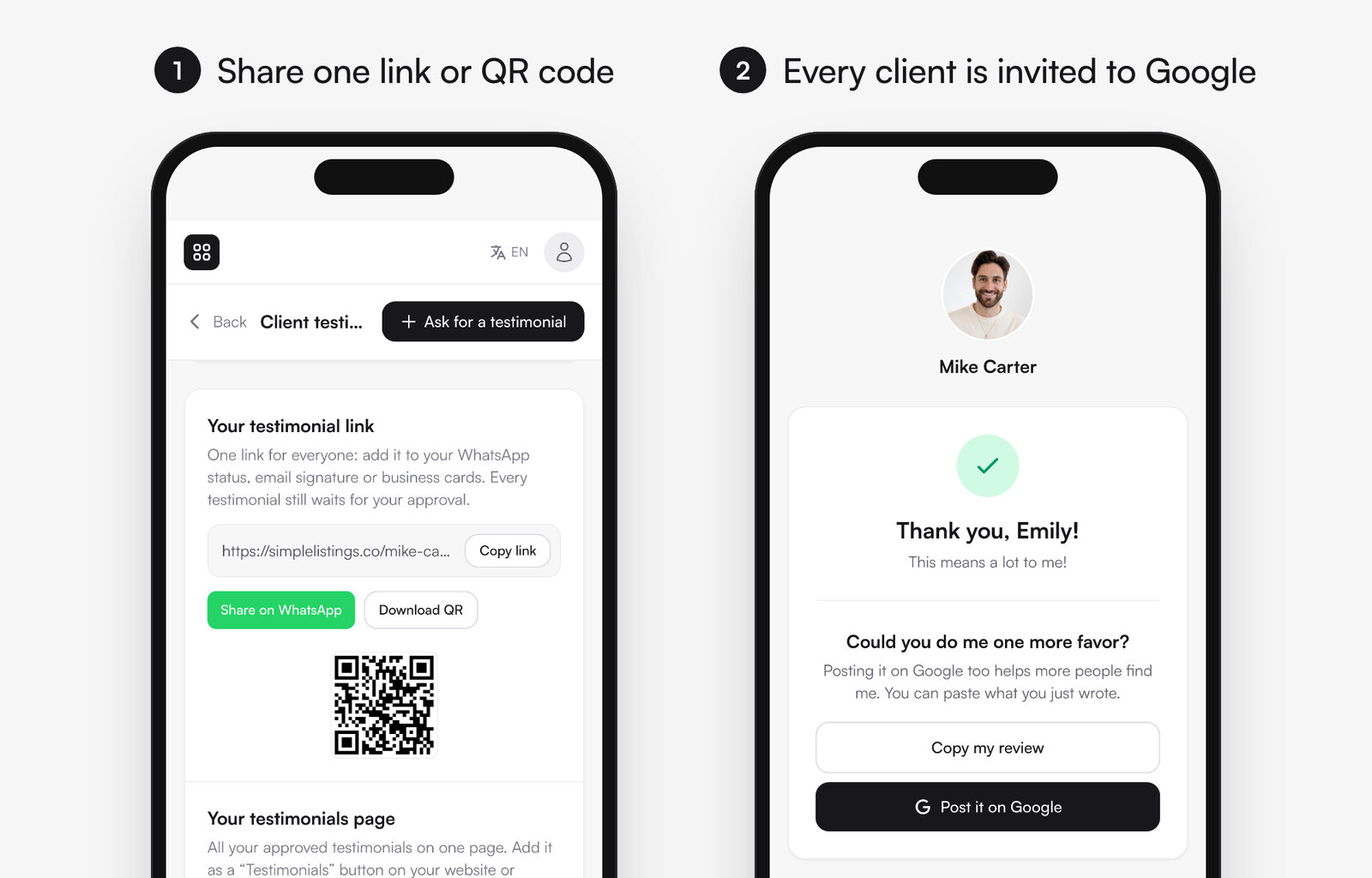
- A request in one tap. Type the client’s name and send a ready-made message by WhatsApp, SMS or email.
- Reminders. If you added an email and the client hasn’t answered in three days, we send one friendly reminder. For WhatsApp, a “Remind” button prepares the follow-up.
- One link and QR code for everyone. For your email signature, business cards, closing cards and WhatsApp status. Every testimonial waits for your approval.
- No account needed. Clients answer from their phone with stars and a few words, or a short video on Pro.
- The Google invite, for everyone (Pro). Paste your Google review link in your settings. After submitting, every client, whatever their rating, sees “Post it on Google” with a “Copy my review” button, so posting takes one paste.
- Reviews where clients decide. Approved testimonials show on your bio link page, your listings and your website widget, and any of them can become an Instagram post.
Make your next closing your next Google review Free plan: unlimited requests and your 3 latest testimonials on your pages. Pro adds the Google review invite, video testimonials and all your testimonials everywhere.
Send my first review requestRelated: how to ask clients for a review (20 scripts), 50+ realtor review examples and the real estate bio link guide, where your reviews do the most work.