Most agents have the same problem with testimonials: a few on Zillow, some on Google, one on Facebook, and none on the website or listing page a seller actually looks at. The right tool makes it easy to ask, and puts the answer where prospects will see it.
This guide compares nine options, including the two real estate specialists agents usually search for, RealSatisfied and Testimonial Tree, the free portal and Google options, and general testimonial software.
How we made this list: SimpleListings makes the first tool on it, so weigh our ranking with that in mind. We read each vendor's own pricing and feature pages on November 4, 2026. Where a vendor doesn't state something, we say so instead of guessing. We also say where other tools are a better choice than ours.
Quick answer: the best testimonial tool for each kind of agent
- Solo agents and small teams starting free: SimpleListings. Ask by text, email or WhatsApp, and show testimonials on the website you already have.
- Ratings on your Realtor.com profile: RealSatisfied, or Testimonial Tree. Both are named on Realtor.com's own support page.
- Brokerages that want reporting: Testimonial Tree, or Birdeye for multi-office reputation management.
- No budget at all: a free Google review link, plus review requests from your Zillow and Realtor.com profiles.
- Video first: Boast, or Senja if you want a free plan to try it.
Testimonial tools compared: price, channels and video
| Tool | Real estate only? | How you ask | Video | Starting price |
|---|---|---|---|---|
| SimpleListings | Yes | Text, email, WhatsApp, link, QR | Pro plan | Free; Pro $19/mo |
| RealSatisfied | Yes | Automatic after closing; channels not stated | Not stated | $19/mo, or $15/mo yearly |
| Testimonial Tree | Mainly | Email; SMS on Pro | Not stated | $45/mo |
| Google Business Profile | No | Link or QR you send yourself | Not stated | Free |
| Zillow | Yes | Email or direct link | Not stated | Part of your profile |
| Realtor.com | Yes | Email from your dashboard | Not stated | Part of your profile |
| Senja | No | Shared link or form, invites | Yes | Free; from $29/mo |
| Boast | No | Email; SMS on Team | Yes | $50/mo, billed yearly |
| Trustmary | No, has a real estate page | Link, QR, email; SMS in Europe | Yes | Free; paid from $191/mo |
| Birdeye | No, has a real estate page | Text or email | Not stated | Not published |
US dollar prices as listed on each vendor's site on November 4, 2026. "Not stated" means we didn't find it on the vendor's pricing or product pages, not that the feature doesn't exist. Prices change, so check before you buy.
The 9 best testimonial tools for real estate agents
1. SimpleListings: best for solo agents and small teams
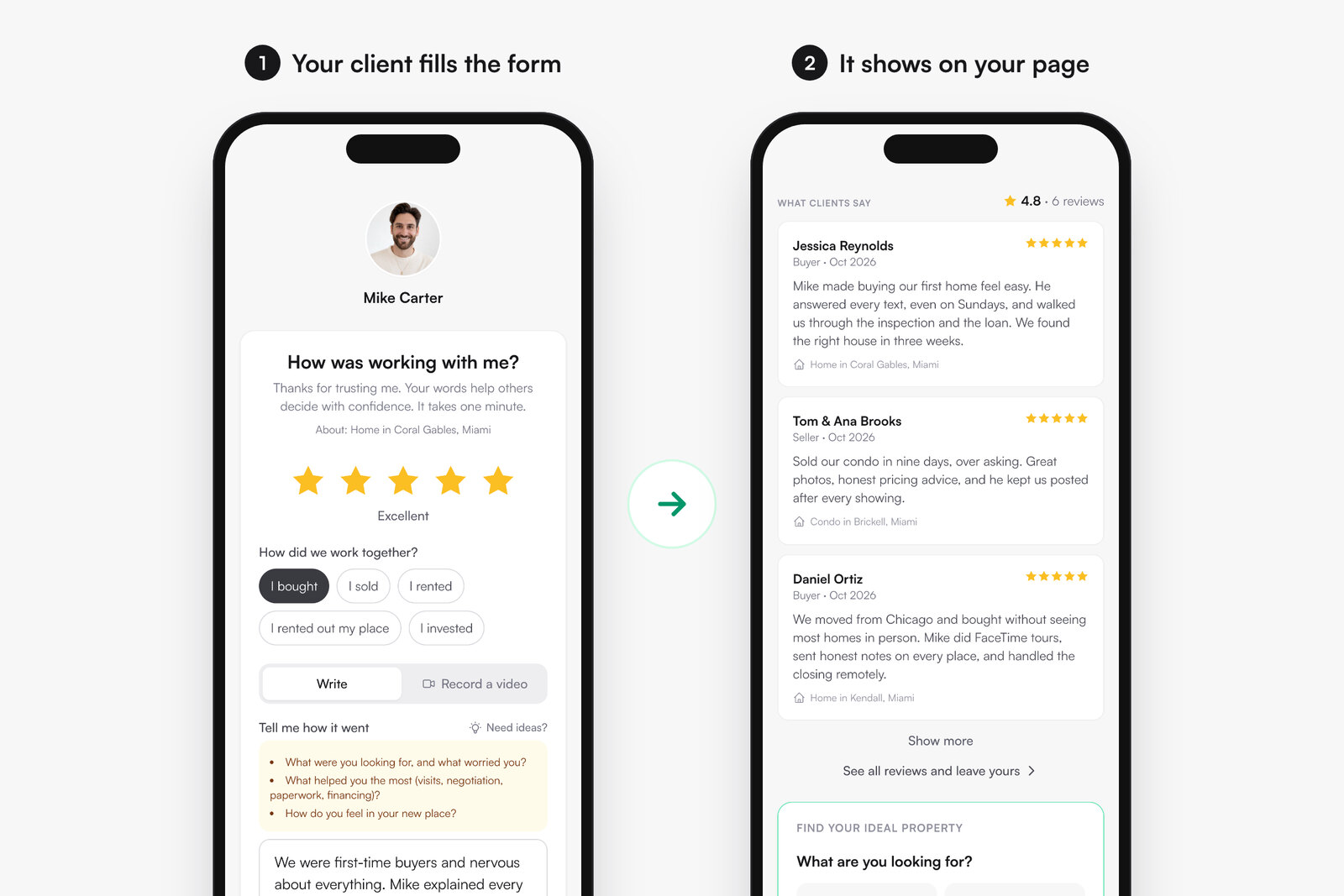
SimpleListings lets you send clients a link by text, email or WhatsApp, or show them a QR code in person. They pick stars and write a few words or record a video from their phone, with no app or account. You approve each testimonial, and it shows on your website widget, listing pages, bio link and testimonials page.
- Price: Free collects unlimited testimonials and shows your 3 most recent, with a small SimpleListings line. Pro is $19/mo, or $16/mo billed yearly, and shows all of them, removes the line, and adds video and the Google invite. Advanced is $29/mo and gives each agent their own link and page.
- Why it stands out: WhatsApp is a standard way to ask, and every reviewer gets the Google invite whatever rating they gave, which keeps you within Google's rules. It works with your current website, so you can paste one line of code into WordPress, Wix or Squarespace.
- Where others are better: it doesn't send reviews to Realtor.com or Zillow, and it doesn't start requests automatically from a CRM or closing. Choose RealSatisfied or Testimonial Tree if those matter most. You can paste in the reviews you already have from other sites, labeled with where they came from.
For the message to send, see how to ask clients for reviews and these realtor review examples.
2. RealSatisfied: best for Realtor.com visibility
RealSatisfied is built only for real estate. It requests feedback after each closed transaction, publishes to social networks, and offers a website widget and WordPress plugin. Realtor.com's support page confirms RealSatisfied ratings can display on your profile.
- Price: Agent PRO is $19/mo, or $15/mo billed yearly. Broker PRO is $125/mo with the first 15 agents included. Enterprise is by quote.
- Best for: US agents who care most about their Realtor.com profile.
- Watch out for: the free Agent LITE plan is only available through partnerships and stops at 3 testimonials. Its site doesn't state video collection or which channels requests go through.
3. Testimonial Tree: best for brokerages
Testimonial Tree focuses on brokerages and larger teams. It handles testimonials and surveys, tracks results across users, and creates share images for social media. It says it syndicates to Google, Facebook, Zillow, Realtor.com and LinkedIn, and Realtor.com's support page confirms the import on its side.
- Price: Basic is $45/mo for 1 user, up to 15 requests a month and email only. Pro is $150/mo plus a $300 setup fee for 12 users, 100 testimonial requests and 100 survey requests a month, with email and SMS. Enterprise is custom. There's no free plan listed.
- Best for: brokers who want to measure client satisfaction across a whole office.
- Watch out for: Basic has no SMS and a low monthly cap, so a solo agent may find it expensive for what's included.
4. Google Business Profile: best free option for local search
Your Google Business Profile gives you a free review link and QR code. Google says you can share it by email, WhatsApp or Facebook. Our free Google review link generator finds yours without logging in.
- Price: free.
- Best for: every agent, alongside any other tool, because these reviews appear when people search your name.
- Watch out for: clients need a Google account, there's no reminder system, and reviews live on Google rather than on your listing pages. More in how to get more Google reviews.
5. Zillow and Realtor.com: best for portal profiles
You don't need software to ask for portal reviews. Zillow lets you email up to 50 addresses a day or copy a direct link to your review form. Realtor.com sends an email invitation from your dashboard once you enter the transaction details.
- Price: requesting is part of your profile. Neither page states a separate cost.
- Best for: US agents whose buyers and sellers check portals before calling.
- Watch out for: Zillow reviewers must have a Zillow profile, and Realtor.com only publishes reviews tied to a buy or sell transaction. On both, you can't delete a published review, and the review stays on the portal.
6. Senja: best general tool for showing testimonials
Senja isn't made for real estate, but it collects written and video testimonials through a shared link and offers more than 20 widget templates and a Wall of Love page. Its pricing FAQ lists Zillow among the sources it can import from.
- Price: Free covers 15 testimonials with Senja branding. Starter is $29/mo, and Pro is $59/mo.
- Best for: agents who care most about how testimonials look on their site.
- Watch out for: past 15 on the free plan, new testimonials stay hidden until you upgrade. It doesn't state any real estate CRM integrations.
7. Boast: best for automated video requests
Boast collects video, photo and text through email sequences, adding SMS on the Team plan. It also offers display widgets and video downloads for social media.
- Price: billed yearly, Basic is $50/mo for 600 responses a year, Team is $100/mo for 1,800, and Premium is $208/mo for 6,000. There's a 14-day free trial and no free plan.
- Best for: teams that use video in their marketing and have the budget for it.
- Watch out for: it's more than most solo agents need, given how few closings a year most of them have. The trial watermarks videos and widgets.
8. Trustmary: best for surveys and per-agent feedback
Trustmary is general software with a dedicated real estate page. It runs surveys, collects written and video reviews, and can separate feedback by agent while using one widget. Requests can go by link, QR code, email and website embed.
- Price: Solo is free with 5 survey responses a month. Paid plans are listed at $191, $388 and $650 a month, and the page offers a discount for paying yearly.
- Best for: offices that want feedback surveys as well as testimonials.
- Watch out for: SMS is listed as Europe only, and it doesn't state a Zillow or Realtor.com integration. Paid plans cost a lot for one agent.
9. Birdeye: best for multi-office reputation management
Birdeye is a general reputation platform with a real estate page. It sends review requests by text or email, tracks reviews across more than 200 sites, and says it integrates with Dotloop and Follow Up Boss.
- Price: not published. You request a quote based on your number of locations.
- Best for: brokerages with several offices and someone to manage reputation.
- Watch out for: it's far more than an individual agent needs.
Other tools we checked
These general tools can work, though none is built for real estate. Famewall is among the cheapest, with a free plan for 10 testimonials and paid plans from $12/mo. Shapo is free for 15 testimonials, then $29/mo. Testimonial.to is free for 10 text and 2 video testimonials, then from $25/mo. Vocal Video is mainly for video, with a free plan and paid plans from $99/mo billed yearly. VideoAsk, from Typeform, is a video form tool rather than a testimonial tool, with paid plans from $24/mo billed yearly.
How to choose a testimonial tool
An agent may only close a handful of deals a year, so software priced by response volume is rarely the deciding factor. These five questions matter more:
- Where do your clients answer messages? If they live on WhatsApp or text, an email-only plan will get fewer replies.
- Where should the testimonial end up? Portal profiles, Google and your own website need different tools. Decide which one matters most to you.
- Can your client answer without an account? Every extra step loses people. Zillow and Google both require one, which is a reason to use them alongside a tool that doesn't.
- Do you need it to run on its own? If you close many deals, look for automatic requests tied to your CRM or transactions. If you close a few, asking personally often works better.
- What happens if you stop paying? Check what stays visible on the free plan, and whether testimonials you've collected stay accessible.
The rules to follow when asking for reviews
Some "review funnels" send happy clients to Google and unhappy ones to a private form. Don't use them for Google reviews. Google's policy says businesses must not "selectively solicit positive reviews", and bans incentives such as payment or discounts in exchange for a review.
- Ask everyone, not only the clients you expect to be happy.
- Don't offer anything in return, including a closing gift tied to the review.
- Don't script the content. Google also says businesses shouldn't request that specific content be included, so ask about the client's experience and let them write it.
- Get permission before publishing a testimonial with someone's name on your own site.